Shift right testing: the complete guide to monitoring software in production
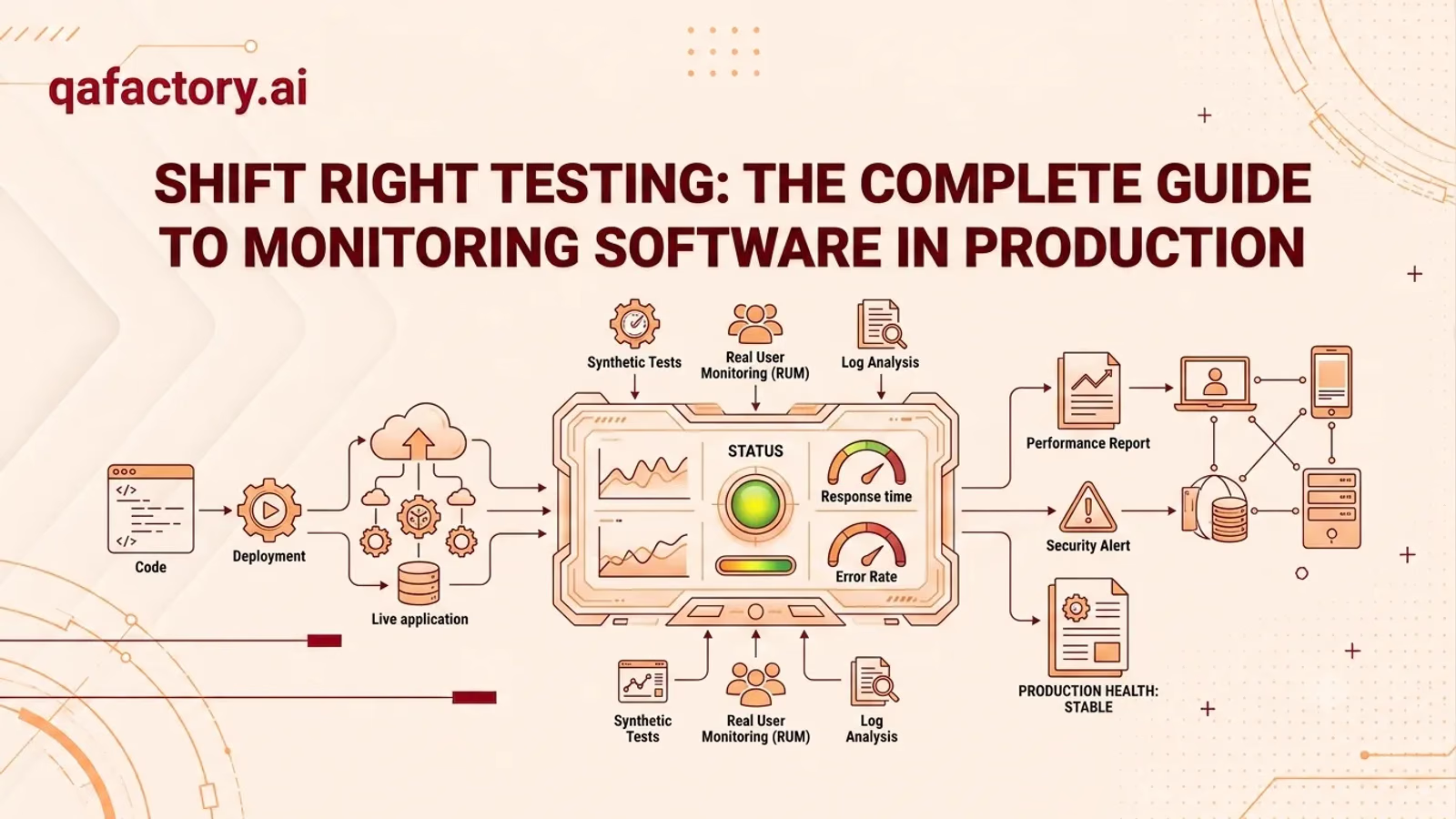
Shift Right Testing means validating software quality after deployment, in production, using real user traffic and live data. It complements Shift Left Testing by catching issues that only surface at scale — performance under load, real-world edge cases, and user behavior patterns that pre-release testing can’t fully replicate.
Deploying code used to mark the finish line. Today, for most SaaS teams, it marks the starting point of a new testing phase.
Production environments are unpredictable. Real users behave differently than test scripts. Traffic spikes, third-party integrations, network conditions, and device diversity all introduce variables that staging environments simply cannot reproduce. A feature that passes every pre-release test can still fail once thousands of real users interact with it simultaneously.
This is the core challenge Shift Right Testing addresses: quality doesn’t end at deployment — it continues to be measured, validated, and improved while software runs live. For SaaS companies operating in competitive, fast-release environments, this shift in mindset has become less of an option and more of a necessity. Continuous delivery pipelines push code faster than ever, which means production has become an essential layer of the testing lifecycle, not an afterthought.
This guide breaks down what Shift Right Testing is, how it compares to Shift Left Testing, the core techniques teams use, and how to build a sustainable, low-risk approach to testing in production.
What is Shift Right Testing?
Shift Right Testing is the practice of testing and validating software quality after it has been released to production, using real user traffic, live systems, and production-grade data. Instead of relying solely on simulated environments, it observes how software actually performs under real-world conditions — real devices, real network latency, real user behavior, and real scale.
The goal isn’t to replace pre-release testing. It’s to close the gap between what testing predicts and what production proves. No test environment can fully replicate production — Shift Right Testing accepts this reality and builds a safety net around it, using monitoring, observability, and controlled experimentation to catch issues early, before they affect the majority of users.
- Faster detection of production-only issues
- Reduced blast radius when problems occur
- Data-driven insight into real user experience
- Increased confidence in continuous deployment
- Lower risk when shipping frequently
Shift left vs. shift right testing
Shift Left and Shift Right aren’t competing strategies — they’re two halves of a complete testing lifecycle.
| Dimension | Shift left testing | Shift right testing |
|---|---|---|
| Timing | Before deployment, early in development | After deployment, in production |
| Goals | Prevent defects before release | Detect and respond to issues after release |
| Environment | Staging, test, and development environments | Live production environment |
| Benefits | Lower cost of fixing bugs, earlier feedback | Real-world validation, real user insight |
| Challenges | Cannot fully simulate production conditions | Requires monitoring maturity and safe rollout controls |
| Use cases | Unit testing, code review, static analysis | Production monitoring, canary releases, chaos engineering |
Understanding it this way makes the relationship clear: Shift Left reduces the number of defects that reach production, while Shift Right ensures the defects that do reach production are caught and resolved quickly, with minimal user impact.
Why Shift Right Testing matters for SaaS companies
SaaS products are never “done.” They evolve continuously, often through multiple deployments per day. That pace changes what quality assurance needs to look like.
- Faster releases. Continuous testing in production allows teams to ship confidently and frequently, without waiting for exhaustive pre-release cycles to catch every possible scenario.
- Continuous validation. Instead of a single quality checkpoint before launch, Shift Right Testing treats quality as an ongoing process — validated continuously against live conditions.
- Better customer experience. Real User Monitoring surfaces friction points that internal testing often misses, because it measures actual behavior rather than assumed behavior.
- Production confidence. Teams with strong observability and rollout controls can deploy changes knowing that issues will be detected and contained quickly.
- Reduced incidents. Techniques like canary releases and feature flags limit exposure, so problems affect a small percentage of users instead of the entire customer base.
Core Shift Right Testing techniques
- Production monitoring — continuous tracking of system health metrics — uptime, latency, resource usage, and error rates — across live infrastructure. This is the foundation most other Shift Right techniques build on.
- Real User Monitoring (RUM) — captures how actual users experience the application: page load times, interaction delays, and session behavior. RUM data reflects reality in a way synthetic tests cannot.
- Synthetic monitoring — scripted transactions run at regular intervals against production to proactively detect outages or performance regressions, even before real users are affected.
- Canary releases — a new version is rolled out to a small subset of users first. If metrics remain healthy, the release expands gradually; if not, it’s rolled back before wider impact.
- Blue-green deployment — two identical production environments run in parallel. Traffic is switched from the old version to the new one only once it’s verified, enabling near-instant rollback.
- Feature flags — features are deployed but toggled on for specific user segments. This decouples deployment from release, allowing teams to test in production without exposing every user.
- Chaos engineering — deliberately injecting failures — like network latency or service outages — into production to verify systems recover gracefully and behave predictably under stress.
- A/B testing — two variants of a feature are shown to different user segments to compare performance, usability, or conversion outcomes based on real behavioral data.
- Log monitoring — centralized collection and analysis of application and infrastructure logs to detect anomalies, trace errors, and understand system behavior over time.
- Error tracking — real-time capture and aggregation of exceptions and crashes in production, prioritized by frequency and user impact so teams can triage effectively.
Best practices
- Start with strong observability. Metrics, logs, and traces should be in place before scaling up production testing efforts.
- Use progressive rollouts. Canary releases and feature flags reduce blast radius for every change.
- Define clear rollback criteria. Know in advance what metrics trigger an automatic or manual rollback.
- Correlate Shift Left and Shift Right data. Feed production findings back into pre-release test suites.
- Prioritize Real User Monitoring. Synthetic checks are useful, but RUM reflects what customers actually experience.
- Automate alerting thresholds. Manual log review doesn’t scale; automated alerts do.
- Practice chaos engineering incrementally. Start with low-risk failure injection before testing critical systems.
- Segment your rollout audience carefully. Internal users, then a small external cohort, then general availability.
- Document incidents and learnings. Every production issue is a data point for improving future releases.
- Align teams around shared dashboards. Engineering, QA, and product should see the same production health data.
Common mistakes
- Treating production monitoring as a replacement for pre-release testing, rather than a complement to it
- Rolling out changes to 100% of users without a canary or staged approach
- Collecting production data without defined alert thresholds, so issues go unnoticed
- Ignoring Real User Monitoring in favor of synthetic checks alone
- Lacking a clear, tested rollback plan before deploying
- Running chaos engineering experiments without stakeholder buy-in or safeguards
- Failing to feed production incidents back into the development and QA process
- Overloading teams with alerts, leading to alert fatigue and missed critical signals
- Testing only “happy path” scenarios in production instead of edge cases and failure modes
- Treating Shift Right Testing as a one-time initiative instead of an ongoing discipline
The QAFactory RIGHT Framework
To help engineering and QA teams operationalize Shift Right Testing, QAFactory developed the RIGHT Framework — a structured approach to building quality assurance into production, not just before it.
- 1 R — Release safelyEvery release should be controlled, not absolute. Use canary releases, blue-green deployments, and feature flags to limit exposure and enable fast rollback when something doesn’t behave as expected.
- 2 I — Inspect real user behaviorProduction quality can’t be assumed — it has to be observed. This step centers on Real User Monitoring and session-level analysis to understand how customers genuinely interact with the product.
- 3 G — Gather production insightsLogs, error rates, performance metrics, and synthetic monitoring results are aggregated into a single, actionable view of system health, rather than scattered across disconnected tools.
- 4 H — Harden through continuous validationChaos engineering and ongoing synthetic checks stress-test the system continuously, verifying resilience before failures become customer-facing incidents.
- 5 T — Transform findings into better releasesProduction data doesn’t stop at detection. It feeds back into the development and Shift Left testing process, closing the loop so each release is informed by the last.
The RIGHT Framework doesn’t replace existing DevOps or SRE practices — it gives teams a repeatable structure for applying them consistently across every release.
Frequently asked questions
What is Shift Right Testing?
Shift Right Testing is the practice of validating software quality after deployment, using real production traffic, monitoring, and controlled experimentation to catch issues that pre-release testing can’t fully replicate.
Why is Shift Right Testing important?
It closes the gap between simulated test environments and real-world usage, helping teams detect performance issues, edge cases, and user experience problems that only appear at scale.
Shift Left vs Shift Right Testing — what’s the difference?
Shift Left focuses on preventing defects before release through early testing, while Shift Right focuses on detecting and resolving issues after release, using live production data.
Is Shift Right Testing only for SaaS companies?
No. While SaaS companies benefit significantly due to continuous deployment cycles, any organization running production software — including e-commerce, fintech, and enterprise platforms — can apply Shift Right Testing principles.
How does Shift Right Testing improve software quality?
It provides continuous, real-world feedback on system performance and user experience, allowing teams to identify and fix issues faster and with more accurate context than pre-release testing alone.
Can Shift Right Testing be automated?
Yes. Synthetic monitoring, automated alerting, canary analysis, and chaos engineering experiments can all be automated as part of a continuous testing and observability pipeline.
Does Shift Right Testing replace Shift Left Testing?
No. They’re complementary. Shift Left reduces the number of defects that reach production; Shift Right ensures the ones that do are caught and resolved with minimal impact.
What tools are commonly used for Shift Right Testing?
Teams typically combine observability platforms, log aggregation tools, feature flag systems, and monitoring frameworks such as Prometheus, Grafana, and OpenTelemetry to implement Shift Right Testing.
Conclusion
Software quality no longer ends at deployment. Shift Right Testing extends quality assurance into the environment that matters most — production, where real users, real data, and real conditions reveal what pre-release testing alone cannot.
By combining Shift Left and Shift Right practices, SaaS teams gain both prevention and detection: fewer defects reaching users, and faster resolution when issues do occur. Techniques like canary releases, feature flags, chaos engineering, and Real User Monitoring aren’t isolated tactics — they work together as a continuous testing strategy.
For teams building or maturing their production testing approach, QAFactory’s QA and testing services can help design monitoring strategies, rollout safeguards, and validation pipelines suited to your release cadence.
About this article: this guide was prepared by the QAFactory team as a practical reference for engineering leaders building a production testing strategy. It reflects general software testing and observability practices as of 2026.